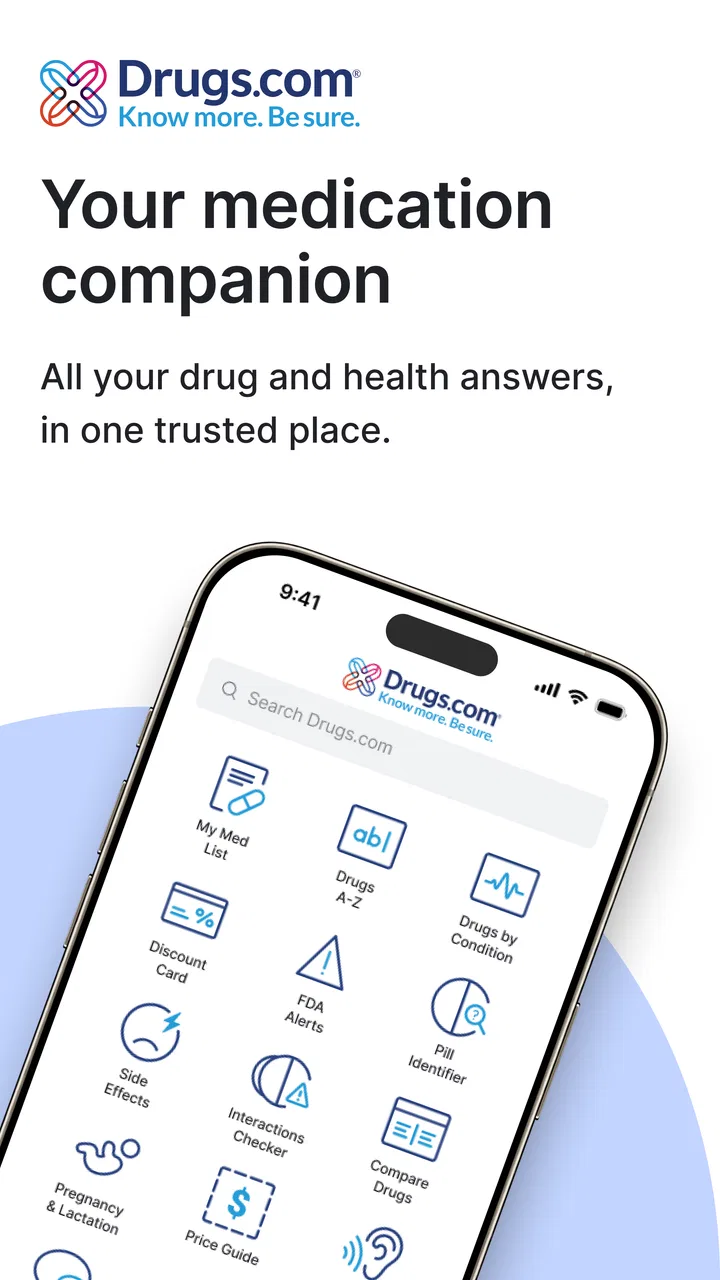
Drugs.com Medication Guide
- 4.7
- Rating
- 1.00M
- Installs
- Free
- Price

 Analysis by App-foxy
I installed Drugs.com Medication Guide to see whether it can make everyday medicine information easier to reach, especially when someone is tired, worried, using a small screen, or helping another person. It is a free medical app from Drugs.com, focused on looking up medicines, identifying pills, and keeping track of medications. That combination sounds simple, but it covers several very different needs, so the quality of the experience depends on how you plan to use it.
My overall impression is that it works best as a practical reference tool rather than a replacement for a pharmacist or doctor. I found it useful when I wanted to check what a medicine is generally used for, understand common warnings, or organize a list before speaking with a healthcare professional. Its strong public reception reflects that usefulness: it has a 4.7 average from around 37 thousand ratings and more than a million installs. Still, popularity does not remove the need to read carefully, verify personal advice, and allow extra time when the information feels dense.
How the app handles readability and navigation
The first thing I noticed is that the app is built around direct searching. Instead of making me move through a broad medical encyclopedia, it lets me begin with the name of a medicine or with a pill-identification task. That matters when I am standing in a kitchen with an unlabeled tablet nearby or trying to check a prescription while preparing for an appointment. The main value is not visual decoration; it is getting from a question to a relevant medicine page without unnecessary wandering.
You May Also Like

 Blood Strike: 2.5 Anniversary
Blood Strike’s Loadouts Turn Every Drop Into a Tactical Gamble
A close look at Blood Strike’s custom loadouts: how fast access to signature weapons reshapes its battle royale rhythm, rewards preparation, and narrows the gap between fights.

 Pandora - Music & Podcasts
Pandora’s Music Is Easy to Start, but Harder to Recover
Pandora’s strength is its low-effort path from a seed to a station. Its weak spot is how much confidence it asks you to place in connection, setup, and quiet recovery.

 8 Ball Pool
 Is Built on Rivalries, Rematches, and Routine
A close look at the rivalries, rematches, shared routines, and unanswered safety questions that turn a quick pool match into a persistent mobile community.

 Samsung Music
’s Quiet Strength Is Playing What You Already Own
Its reach comes less from spectacle than from dependable access to a personal library. That simplicity is both the app’s strongest retention engine and its ceiling.

 AccuWeather: Weather Radar
AccuWeather Review: A Quick, Clear Forecast for Everyday Decisions
For everyday plans, the best forecast is the one you can understand quickly. AccuWeather makes rain timing, radar, and local conditions easy to act on, with a few trade-offs.

 Hill Climb Racing
Why Hill Climb Racing Still Turns Crashes Into One More Run
A tiny car, a bumpy hill and one more upgrade: Hill Climb Racing keeps resurfacing because its simple chaos makes every near-miss feel personal.
More From Our News Desk
View All News


The medication pages are information-heavy, which is appropriate for a medical reference but not always comfortable for casual reading. I found myself scanning headings and short sections rather than reading from top to bottom. That is a good habit with this app: first identify the medicine, then look for the section that answers the immediate question, and only afterward read the surrounding warnings and instructions. The safest workflow is to treat search as the beginning of verification, not the end of it.
For someone who has difficulty with long passages, the app can still be useful if it is approached in small steps. I would search for one medicine at a time, pause at the purpose and warning sections, and save broader reading for a calm moment. A person supporting an older relative could also prepare a short list of medicine names before opening the app, rather than asking the relative to remember every label while feeling unwell.
The wording is generally more reference-like than conversational. That gives the content a serious tone, but it can make unfamiliar medical terms slow to process. I would not rely on a single sentence or bold warning without reading the nearby context. A term that sounds alarming may need explanation, while a seemingly ordinary instruction may be important for a particular person. When a phrase is unclear, I would write it down and ask a pharmacist instead of guessing.
Navigation also benefits from a deliberate routine. I found it easier to use the app when I knew whether I was checking a drug, identifying a pill, or reviewing my medication list. Mixing those tasks in one hurried session can create confusion, especially if several medicines have similar names. Keeping the goal narrow reduces the chance of acting on information from the wrong product.
Reading when attention and energy are limited
Medical information is often read under poor conditions: after a new prescription, during a headache, or while caring for someone else. In those moments, a clean search path is more valuable than a large collection of optional tools. Drugs.com Medication Guide is most helpful when I use it as a focused reference and resist the temptation to browse every related topic.
It is also worth separating general education from personal instructions. The app can help me understand what a medication is commonly associated with, but my prescription label, clinician, and pharmacist remain the authorities for how I should take it. That distinction is particularly important for dosage, missed doses, combinations, pregnancy-related concerns, allergies, and symptoms that may require urgent care.
Motor, sensory, and situational considerations
From an inclusive-use perspective, the app’s strongest point is that it can reduce the physical effort of searching through printed leaflets or several browser pages. A person with limited hand movement may prefer entering one medicine name instead of handling a collection of packaging inserts. Someone with low stamina can prepare a medication list in advance and consult it during a short appointment rather than trying to reconstruct everything from memory.
At the same time, the experience still depends on ordinary phone interaction: tapping, scrolling, reading, and distinguishing one result from another. That creates friction for people with tremors, reduced dexterity, vision limitations, or difficulty maintaining attention. I would use the phone’s own display and text settings where available, keep the device steady on a table, and avoid searching while walking or multitasking. Those are practical adjustments, not guarantees that every screen will suit every user.
For sensory needs, the main challenge is the amount and seriousness of the information. A person who is sensitive to dense screens or anxious medical language may find a long medicine entry overwhelming. I recommend opening the app with a specific question written down, such as “What is this medicine generally for?” or “What warning should I ask the pharmacist about?” That approach makes the session more predictable and reduces unnecessary exposure to unrelated material.
Pill identification deserves extra caution. It can be a helpful starting point when a tablet is separated from its packaging, but visual details alone should never be treated as final proof of identity. Shape, color, and markings can be shared by different products, and a mistake could be dangerous. I would compare the result with the original container and confirm uncertainty with a pharmacist. In an emergency or suspected poisoning situation, I would seek immediate professional help rather than relying on an app.
The medication-management side is most useful when it supports preparation. Before a medical visit, I can review the medicines I take, note questions, and bring the list to a professional. This is more valuable than trying to use the app as an automatic decision-maker. A person who has memory difficulties may benefit if a trusted caregiver helps maintain the list, checks spelling, and confirms that old medicines are not being treated as current ones.
A realistic everyday scenario
Imagine that I have just returned from a clinic with a new medicine and already take several others. I open the guide, look up the new name, and read the general purpose and caution sections before adding it to the list I plan to show my pharmacist. I then compare the spelling with the package, note any unfamiliar term, and ask whether the new medicine fits with the rest of my routine. The app has saved time, but the professional conversation still makes the final decision.
Another useful situation is helping a family member who cannot easily read a leaflet. I can search while they keep the packaging nearby, enlarge the phone display if needed, and explain one section at a time. I would avoid summarizing from memory or saying that a medicine is safe simply because the app describes common uses. The guide supports communication; it does not transfer responsibility for a personal treatment decision to the person holding the phone.
Where it fits among usual alternatives
The most obvious alternative is a web search. A browser can reach a wider range of sources, but it can also mix official information, advertisements, outdated pages, and personal opinions. Drugs.com Medication Guide feels more purposeful when I already know the medicine I want to investigate. It reduces the number of unrelated results and makes repeated reference more convenient.
A printed leaflet remains better in some situations. It is available without a battery, does not require typing, and is tied directly to the package supplied for a particular medicine. For someone with limited phone confidence or unreliable internet access, the leaflet and a pharmacist may be more practical. I see the app as a companion to that material, not a reason to discard it.
A pharmacy consultation is the better option when the question involves a personal dose, a possible interaction, a serious reaction, or uncertainty about whether to start or stop treatment. The app can help me form a clearer question before I call, but it cannot examine me, review every part of my medical history, or observe symptoms. That limitation is not a flaw unique to this product; it is the boundary of a reference app.
Dedicated medication-reminder tools may be preferable for people whose main need is alarms and routine prompts. Drugs.com Medication Guide is more appealing when information, pill identification, and medication organization matter together. If a user wants a highly specialized reminder system, a different category of app may fit better. If the user wants a dependable reference beside a medication list, this guide has a more convincing role.
Practical trade-offs and remaining barriers
The app is free, which makes it easier to recommend as a first reference for people who do not want another subscription. It is intended for a Teen audience, and its developer is Drugs.com. The current version is 3.1.61, and it supports devices running Android 7.0 or later. Those requirements are reasonable for many users, but anyone relying on an older phone should check compatibility before building a routine around it.
Its long presence in the medical-app category also helps explain why it feels like a reference library rather than a lightweight checklist. It was released on February 24, 2013, and the product has accumulated a substantial user base since then. That history can be reassuring for people who want an established name, although I would still judge every answer by its relevance to the medicine and situation in front of me.
One barrier is cognitive load. The more medicines a person takes, the easier it becomes to confuse similar names, duplicate entries, or old prescriptions. I recommend reviewing the list with a pharmacist at intervals and removing uncertainty through conversation rather than silently editing until everything looks tidy. A clean list is useful only if it reflects reality.
Another barrier is emotional. Searching a medicine after noticing a new symptom can lead to worry, especially when a page includes many possible reactions. I try to separate common educational information from signs that need urgent attention, and I avoid diagnosing myself from a list. If the symptom is severe, sudden, or frightening, professional help should come before further browsing.
People with limited English medical vocabulary may also need support from a trusted person or clinician. The app can provide a central place to investigate, but that does not automatically make every term easy to understand. Reading aloud, taking notes, and asking for a plain-language explanation can make the information more usable than silently guessing at terminology.
Privacy and device context deserve common-sense care as well. I would avoid entering or discussing medication details on a shared phone without considering who else can see the screen. I would also avoid using the app as a public display of someone’s health information. These are ordinary precautions, but they matter when medication lists are involved.
My inclusive verdict
Drugs.com Medication Guide is a strong choice for focused medicine research, pill-identification support, and preparing a medication list for a professional conversation. I especially recommend it to people who want one familiar place to look up a drug instead of sorting through random search results. Its free access and broad reach make it easy to try, while the combination of reference material and medication organization gives it more practical value than a simple drug dictionary.
I would be more cautious about recommending it as the only tool for someone with significant vision, motor, reading, or memory challenges. The app can reduce some effort, but it still asks the user to search accurately, read dense information, interpret context, and make sensible decisions about when to seek help. A caregiver, pharmacist, or accessibility setting on the phone may be necessary to turn the app into a genuinely comfortable part of that person’s routine.
For me, the best way to use it is with a three-step habit: identify the exact medicine, read enough context to understand the warning or purpose, and confirm personal decisions with a healthcare professional. That habit prevents the most serious misunderstanding while preserving the app’s convenience. I would skip it if I wanted diagnosis, emergency guidance, or a fully specialized reminder system, but I would keep it installed as a dependable reference beside my prescriptions.
In the end, this is not an app that replaces human care, and it does not need to be. Its value comes from making the questions clearer before that care happens. Used patiently and with attention to different abilities and circumstances, it can help a person feel less lost around medicines without pretending that a phone screen can make the final clinical judgment.
FAQs for Drugs.com Medication Guide
01What is Drugs.com Medication Guide and how does it work?
Drugs.com Medication Guide is a comprehensive app designed to help users manage their medication schedules and access detailed drug information. It offers features like pill identification, interaction checks, and personalized medication records. By providing reliable data from trusted sources, the app ensures users have the information needed to safely manage their medications.
02Is Drugs.com Medication Guide free to use, or are there any in-app purchases?
The app is free to download and offers a wealth of information without charge. However, it may include optional in-app purchases or subscriptions for enhanced features, such as advanced interaction checks or ad-free experiences. Users can explore these options within the app settings to decide what best suits their needs.
03How reliable is the drug information provided by the app?
Drugs.com Medication Guide sources its information from trusted medical databases and experts in the field. The app is regularly updated to reflect the latest medical guidelines and research, ensuring that users receive accurate and dependable drug information. However, it is always recommended to consult healthcare professionals for personalized advice.
04Can the app help in identifying pills and checking drug interactions?
Yes, the app includes a pill identification tool that allows users to identify unknown pills by entering their physical characteristics, such as shape, color, and imprint. Additionally, the app features a drug interaction checker that helps users understand potential interactions between different medications, contributing to safer medication management.
05Is the Drugs.com Medication Guide app available on both Android and iOS?
Yes, Drugs.com Medication Guide is available for both Android and iOS platforms. Users can download it from the Google Play Store or Apple App Store, ensuring compatibility with a wide range of devices. This accessibility makes it easy for users to manage their medication information across different smartphones and tablets.
Pros
- Comprehensive drug information database.
- Regular updates ensure accuracy.
- User-friendly interface design.
- Includes pill identifier tool.
- Customizable personal medication records.
Cons
- Requires internet for full functionality.
- Ads can be distracting.
- Limited offline access to information.
- Some features need premium access.
- Might overwhelm new users with data.

Drugs.com Medication Guide
Gallery